A face on the desk.
Vibbe’s expressions on the portrait RGB display. This is a local character appearance in the current ChatGPT Voice build, not a Dots connection.
VibeBot · private working prototype
A face for the conversation.
A companion on the desk.
My bot already connects to ChatGPT Voice. A portrait RGB display gives it expressions, a moving mouth and a place to show what we make together.
Where this build is going
Current status and intended focus. These are directions, not promised release dates.
AI. Off-screen.
VibeBot is the project and repository. Vibbe is the name I gave my bot. The current build combines a Windows companion app, a local plugin connection and real RGB matrix hardware.
ChatGPT Voice supplies the conversation. Vibbe brings it onto the desk through the robot’s microphone, speaker and display. Camera-driven eyes, animated characters and drawings make the experience visible.
This is a working personal prototype, with hands-on tests and known rough edges. There is no public download or finished kit yet.
From my workbench
Short, silent clips from my desk. Real screens, real pixels. Press play to take a closer look.
Vibbe’s expressions on the portrait RGB display. This is a local character appearance in the current ChatGPT Voice build, not a Dots connection.
A character, Swedish and EU flags, and a pixel smile on the large display. Recorded output from the build; not a Muse account connection.
A character animation on a handheld display. Another screen experiment, without a claim of standalone voice or a connected Muse account.
These web clips have no audio track. The original build films below include voice and commentary.
A real LED-matrix appearance in my “Release the Dots in Europe” film. This is a request for access, not a live Dots integration.
The physical bot, its pixel face and voice. The video introduces the Windows-driven build and three-panel portrait display.
An earlier Llama 3.2 3B / Qwen3 4B and Whisper experiment, while tuning speed and personality. A different route from today’s ChatGPT Voice setup.
The current experience
The current ChatGPT Voice setup has been used through the robot. The local audio relay carries microphone and return audio; the mouth follows playback. Audio is still buffered, with delay and occasional USB interruptions being worked on.
Camera-to-eye tracking has been confirmed on the physical display. The local renderer adds blinking, gaze and speech motion. Character selection is saved and can change without restarting the ongoing voice relay.
ChatGPT tools can send text cards, pixel art, bounded illustrated scenes and supplied images to the display. A greeting sent from ChatGPT was physically confirmed; newer detailed scenes have device acknowledgements and software tests, with a visual check still needed.
Search, read, draw and build each have a local animation. ChatGPT can report an activity and optional source details. These show what the agent reports—it is not automatic browser tracking or a measured progress bar.
One continuous portrait canvas
Three 64 × 32 RGB panels, stacked vertically: 6,144 physical LED positions. Faces and artwork use the whole canvas.
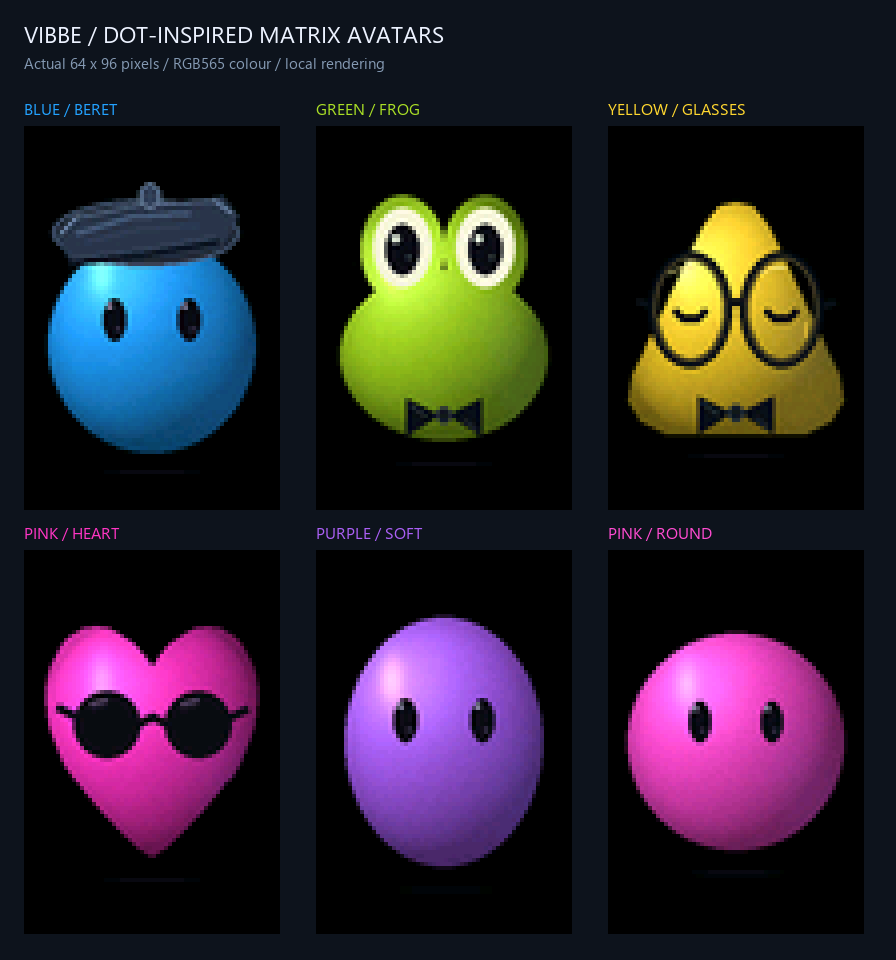
Original pixel faces, Dot-inspired characters and Muse-inspired character experiments use the same display. Choosing a face does not connect a companion account or change the voice provider. ChatGPT Voice remains the current connection.
The display software runs locally. Blinking, movement and animation do not make a new model call for every frame. The conversation and any model-authored content still follow the account or provider’s normal usage rules.


Actual software output with simulated activity and example labels. These previews do not represent live searches, work completion or verified physical readability.
Build checkpoint · 2 October 2026
A test on the computer, a device accepting a command and a person seeing or hearing the result are different checkpoints.
Confirmed on the physical setup
Camera-driven eye following, a ChatGPT-sent greeting on the display and sound through the robot speaker have been confirmed by me. ChatGPT microphone input and return playback have worked. This does not yet establish consistently low-delay, uninterrupted conversation.
Live connection and device checks
The private plugin connection, native 64 × 96 drawings, detailed scenes and all four task animations have been checked against the running display program. Studio light commands, music status/playback and a Codex quota snapshot also have live test evidence. A device acknowledgement alone does not verify the displayed pixels.
Software checked · live acceptance pending
Explicit local memory, character rendering, drawing validation and the “Hej Vibbe” wake experiment have automated checks. End-to-end Voice use of memory, reliable room-voice wake-up and visual acceptance of the latest graphics still need their own tests.
The current connection uses the normal ChatGPT Voice experience, a private tool connection and a separate local audio relay. It is not a standalone ChatGPT audio API product. On this setup, the relay captures a selected computer audio output; other sounds routed there can also reach the bot.
Return audio is buffered. Delayed playback, simultaneous PC playback and intermittent USB timeouts have been observed. Manual “My turn” / F9 support is implemented to yield the robot’s output while keeping the relay available. Reliable automatic spoken interruption and full-duplex conversation are not verified.
An earlier physical echo test measured 8.96 dB suppression, below the project’s 15 dB acceptance threshold. Automatic playback interruption stayed disabled. A revised filter has software checks but still needs physical calibration. Stopping the local bridge does not itself end the Voice call in ChatGPT.
The “Hej Vibbe” desktop wake-up experiment recognizes bounded local commands and has synthetic speech and standby checks. Automatic Voice start in the actual desktop application is not verified. The current browser route is started manually.
Tools reuse the existing local robot connection. A refreshed tool list or a new chat can be needed after updates. An image being visible in a chat does not guarantee that the voice host can provide its bytes to the display tool.
This build uses a Waveshare ESP32-S3 RGB matrix controller and three 64 × 32 RGB panels as one 64 × 96 portrait display, plus the current camera, microphone and speaker setup. A Windows PC runs the companion software and supplies the connection. It is not a self-contained, battery-qualified robot.
The RGB screens in this arrangement are primarily a place for agents and bots. Matrix Studio is another way of using RGB screens in a different physical arrangement. The separate VibeMatrix bar prototype has its own build and evidence; panel arrangement and software mode should not be mistaken for identical hardware qualification.
Enclosure and mechanical work are separate from the VibeBot software repository. Brightness is controlled and currently capped provisionally; final power, cooling, brightness and battery-runtime claims have not been established. Waveshare supplied hardware for development and testing.
Before the current ChatGPT Voice direction, I tried local Llama/Qwen conversation, NVIDIA-hosted conversation, local transcription and speech, and ElevenLabs voice samples. Local Llama conversation and the NVIDIA route received hands-on feedback; NVIDIA was preferred for quality but suffered variable delays and timeouts. Small synthetic timing runs were development checks, not a general model ranking.
Other prepared work includes model routing, cancellable speech, context and selective memory, local face-enrolment software, and dashboard/music integrations. Software checks are not evidence of reliable person recognition, autonomous research or finished hands-free conversation. Earlier experimental provider routes are not all part of the current ChatGPT Voice setup.
The most recent native-display update records 227 focused software checks, real tool discovery and device acknowledgements. Rendering benchmarks measure local drawing time, not end-to-end conversation speed. The separate wake-up work records 812 automatic checks; neither count represents 812 physical conversations.
The local voice bridge processes audio in bounded memory and does not create an audio recording or conversation transcript. ChatGPT still receives the voice input sent to its normal Voice service. Approved companion notes are stored locally, with read, correction and deletion tools; automatic conversation-end saving and autonomous habit learning are not implemented.
A local plugin and a private tunnel provide the tool path. The tunnel is separate from audio transport. Reconnection after a stopped tunnel process has been tested. Startup after a full Windows reboot is still pending. The public site does not distribute credentials, personal notes, private endpoints or the prototype’s installer.
The direction
ChatGPT Voice is the connection I can show today. Next, I want to give more AI companions a place on the desk.
On my wishlist
When I can access Dots and Muse here in the EU, I want to try them with VibeBot and share what actually works.

OpenAI
Waiting for access
I want to explore bringing my dot’s presence and activity onto Vibbe’s display.
Meet Dots
Meta
Waiting for access
I want to explore Muse on the physical display and try its hardware possibilities.
Meet MuseMy next experiments, once access is available to me. No integration has been tested yet and there is no launch date to announce. Brand marks identify the services I want to try; this is an independent project.
Grokbot is also something I want to explore when I have real access. A familiar character on the display is artwork; an account connection needs its own test.
The next work on today’s build is to improve audio reliability and interruption, validate the new visuals in real use, and make activity and attention signals useful without making the bot constantly noisy.