Agent Display · Private developer preview
Your agent.
On your desk.
A small screen.
A real conversation.
Tap to call Grok Bot. Talk through the display’s microphone and speaker. Give the conversation a little space of its own.
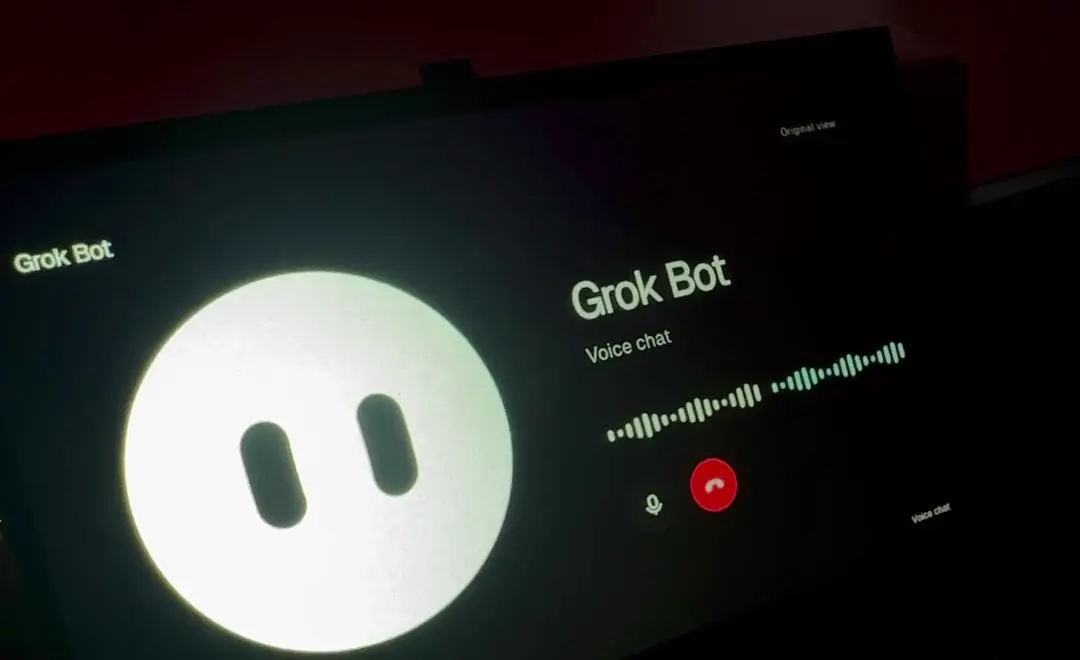
Recorded on the real hardware
One tap.
A real conversation.
The button becomes a conversation: a moving face, voice activity and the two controls you need. Mute. End call.
- 01
Touch to begin.
A clear call button, made for a finger instead of a mouse.
- 02
See the conversation.
Grok’s own character and voice activity stay part of the experience.
- 03
Keep it simple.
Mute or hang up from the same screen. Return to the original view whenever you need it.
The setup
Your computer runs it.
Your display brings it closer.
Agent Display is a Chrome extension. It gives the existing Grok Bot web experience a layout for a dedicated touch screen, while Grok keeps handling the call and audio.
In this build, a Windows PC runs Chrome. The Waveshare connects as a USB display with touch and audio. The ESP32 is not running a hidden browser or a separate voice model.
Touch + audioChrome
Agent DisplayGrok Bot
The real call
What has been tested?
The 0.5.2 prototype was tested on a Windows PC with the Waveshare ESP32-P4-WIFI6-Touch-LCD-7B-C. Touch, microphone, speaker and both voice waveforms worked in the owner’s hands-on call test.
The recording shows that prototype. The separate 0.6.0 distribution package has passed local software and layout checks; its exact packaged version still needs a fresh physical acceptance test. This is not a claim of compatibility with every display or operating system.
What do I need to try it?
A computer with Chrome, a Grok account with access to Bot voice calls, and a display with working touch, microphone and speaker connections. The tested hardware is the Waveshare ESP32-P4-WIFI6-Touch-LCD-7B-C in USB display mode.
Preview setup is currently manual. There is no Chrome Web Store release or finished hardware kit. The extension does not provide a Grok subscription.
How does it connect to Grok?
The extension rearranges the visible Grok Bot page and its existing call controls. It does not use a private call API, scrape tokens or send audio through a replacement service. Grok’s normal account and service terms still apply.
This is an independent interface project, not an official xAI product or supported integration. Changes to Grok’s website can require extension updates. Automatic usage-page reading is not part of this preview.
Is this part of VibePulse or VibeBot?
Agent Display grew out of the VibePulse experiments and now has its own extension codebase. VibePulse focuses on glanceable usage and activity. VibeBot is the separate RGB companion project.
Waveshare supplied development and test hardware. The projects have separate setup requirements and test status.
One interface. Room to grow.
Start with Grok.
The reusable extension is the foundation. Each future agent needs its own verified integration.
- Now
- Grok Bot calls, touch and audio tested on the Waveshare prototype.
- Next
- Verify the packaged extension on hardware and improve first-time setup.
- Exploring
- Separate adapters for Dot, Muse and other agents, where supported access allows.
Dot and Muse are ideas for future work, not working integrations. Camera features and bot switching are outside the current preview.
Follow the build
Want it on your desk?
The project is in private developer preview. Tell me which computer and display you use, and we can see whether it fits the next round of testing.
Opens an email draft. No automatic signup or download.